
Download Article Audio – High‑Quality Text‑to‑Speech, Multi‑Language Audio Converter
Overview
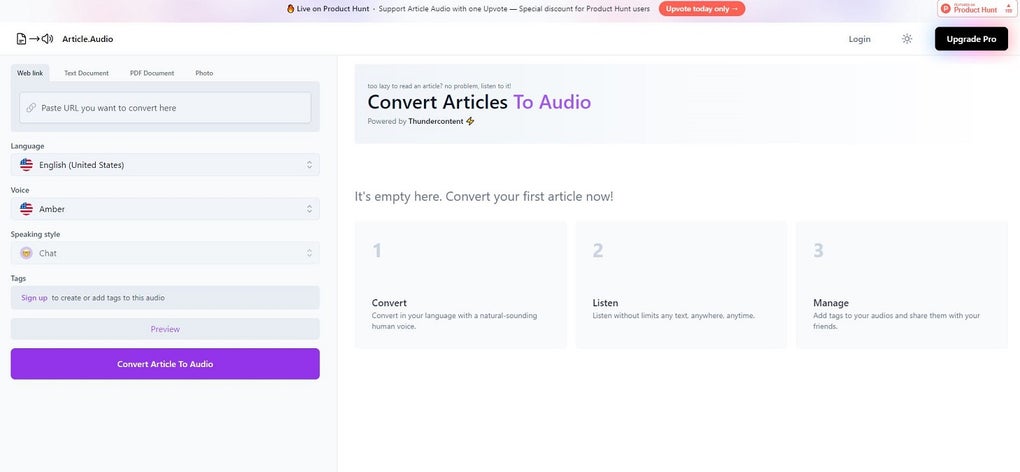
Article.Audio is a powerful, cloud‑based text‑to‑speech (TTS) engine that turns written articles, PDFs, web pages, and even images of text into crystal‑clear audio files. What sets it apart is the breadth of its language support – more than 140 languages and dozens of regional accents – paired with natural‑sounding human‑voice models such as Amber, Abdullah, Alina, and many others. The free version lets users experiment with short passages, while the Pro subscription unlocks batch processing, offline listening, and advanced voice‑customization options.
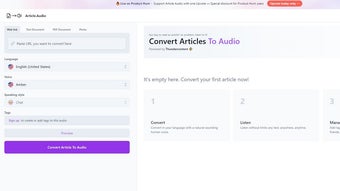
Because the service runs in a lightweight desktop client (available for Windows, macOS, and Linux) and synchronizes with a secure cloud backend, users enjoy fast conversion speeds without compromising privacy. Whether you are a content creator looking to repurpose blog posts for podcasts, an educator needing audio versions of study material, or a multilingual marketer seeking to reach global audiences, Article.Audio delivers a simple, affordable solution that eliminates the need for expensive studio recordings or manual narration. The intuitive UI guides you from source selection to final MP3 export in just a few clicks, making high‑quality audio generation accessible to anyone with a computer and an internet connection.
Key Features and Voice Options
- 140+ Languages & Dialects: From English and Arabic to Japanese, Swahili, and Icelandic, the platform covers virtually every market you might target.
- Human‑like Voice Library: Over 200 distinct voice skins, including gender‑specific and age‑specific tones, let you match the personality of your brand or content.
- Multi‑Source Input: Convert text from plain‑text files, Microsoft Word documents, PDFs, web URLs, and even OCR‑processed images.
- Offline Playback: Pro users can download audio files for offline listening on any device, perfect for travelers or low‑bandwidth environments.
- Custom Accent Tuning: Fine‑tune pronunciation, speed, and emphasis to replicate regional accents or corporate voice guidelines.
- Batch Processing: Upload multiple articles at once and let the engine queue them, saving hours of manual work.
- Secure Cloud Storage: All conversions happen over encrypted HTTPS connections, and files are stored temporarily with auto‑deletion after 24 hours.
- Export Formats: MP3, WAV, and OGG options let you choose the best quality‑size balance for your distribution channel.
- Affordable Pricing: A one‑time $19.99 Pro license or a monthly $4.99 subscription provides flexibility for freelancers and enterprises alike.
- Regular Updates: The development team pushes new voices and language packs quarterly, ensuring you stay ahead of linguistic trends.
Installation, First‑Run Setup and System Compatibility
Installing Article.Audio is deliberately straightforward. After purchasing the Pro license, you receive a download link that detects your operating system and serves the appropriate installer package. For Windows, the installer is an .exe file; macOS users receive a signed .dmg, and Linux users can download a universal .AppImage or a .deb package. The installer verifies the digital signature, then places the application in the standard program directory and creates a desktop shortcut.
Once launched, the first‑run wizard asks you to log in with the credentials provided at purchase. Authentication is handled via OAuth 2.0, ensuring that your license key never travels in plain text. After signing in, the wizard walks you through three core steps: (1) selecting your preferred default language, (2) choosing a voice profile for that language, and (3) configuring default export settings (format, bitrate, and destination folder). All preferences are saved locally in a JSON configuration file, which the app reads on every startup.
Compatibility is broad. Article.Audio runs on Windows 10/11 (64‑bit), macOS 10.15 Catalina and later, and most mainstream Linux distributions that support the Electron runtime. The application requires a minimum of 2 GB RAM and 200 MB of free disk space; a modern dual‑core CPU is recommended for optimal conversion speed. Because the heavy lifting – the actual speech synthesis – occurs on remote servers, local hardware requirements remain modest. The client only streams the source text to the cloud, receives the generated audio stream, and writes it to disk.
For users who prefer a command‑line workflow, the Pro version also ships with a lightweight CLI utility that accepts arguments for source file, language, voice, and output path. This is especially handy for automation scripts or integrating Article.Audio into content‑management pipelines.
Pros, Cons and Frequently Asked Questions
Pros
- Exceptional language coverage with natural‑sounding voices.
- Simple UI that shortens the learning curve for non‑technical users.
- Batch conversion saves time for large projects.
- Reasonable one‑time pricing compared to enterprise TTS solutions.
- Secure cloud processing and automatic file deletion after 24 hours.
Cons
- No dedicated mobile app for iOS or Android (requires desktop).
- Voice‑training (custom voice creation) is not available.
- Free tier limits conversion length to 2 minutes per file.
- Requires an internet connection for every conversion.
- Advanced accent tweaking can be a bit technical for beginners.
Frequently Asked Questions
Can I use Article.Audio for commercial projects?
Yes. The Pro license includes a commercial usage clause that allows you to publish the generated audio in podcasts, videos, e‑learning courses, and marketing campaigns without additional royalties.
How long does a typical conversion take?
Conversion speed depends on text length and server load, but most short articles (500–800 words) are processed in under 30 seconds. Batch jobs of ten articles usually finish within 5 minutes.
Is there a way to keep the audio files private?
All data is transmitted over TLS‑encrypted channels, and generated files are stored on your local machine only. The cloud never retains a copy after the download is complete.
Do I need a powerful GPU for the voice synthesis?
No. Because the speech synthesis runs on Article.Audio’s remote servers, your local hardware only needs to handle the UI and file I/O. Even modest laptops perform perfectly.
Can I edit the generated audio (add music or effects)?
Article.Audio outputs standard audio files (MP3/WAV) which you can import into any digital audio workstation (DAW) for post‑processing, such as adding background music, fade‑ins, or sound effects.
Conclusion & Call to Action
Article.Audio delivers on its promise of turning any written material into professional‑grade audio with minimal effort. Its expansive language library, natural voice models, and straightforward desktop client make it a top contender for freelancers, educators, and businesses seeking to diversify their content distribution. While the lack of a mobile app and advanced voice‑training features keep it from being a complete end‑to‑end solution, the affordable Pro license and regular feature updates compensate handsomely. If you’re ready to boost your accessibility, reach new multilingual audiences, and repurpose your articles into podcasts or audio‑books, there’s no better time to give Article.Audio a try. Click the button below to download the installer, claim your free trial, and experience high‑quality text‑to‑speech without the usual learning curve.
Article.Audio impresses with its linguistic breadth and natural voice output. The installation is frictionless, and the batch conversion feature saves hours for content teams. Minor drawbacks like the absence of a mobile client are outweighed by the overall value, especially at the Pro price point. Highly recommended for anyone needing reliable, high‑quality TTS.



.png)



